PFCam Dashboard
The PFCam Dashboard is used to control the science filter wheel, dewar focus, TV guider
filter, and TV guider 1-axis motion. Each of the four PFCam motors is controlled
from one panel. Settings are selected in each panel and movements are initiated
by clicking the yellow "GO" button. The status field in each panel will display
the current status of its related motor, e.g. "moving" or "move completed."
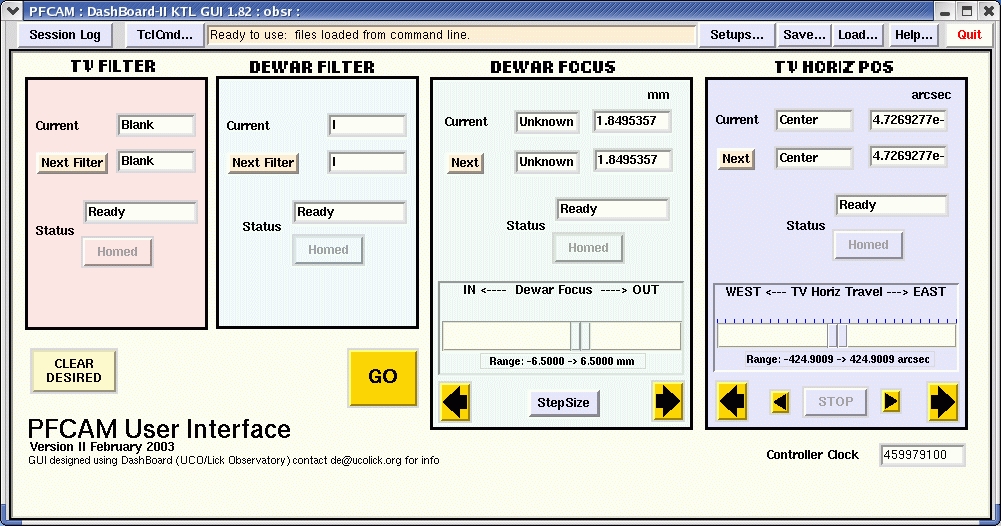
"TV Filter" and "Dewar Filter" respectively place filters in front of the guide
camera (e.g. Spinrad R for suppressing sky background) and the science camera
(e.g. U, B, V, R, and I
filters). It is important to
note that the "Home" position for each filter is just the position the controller thinks
is home, it does not initialize the filter wheel or search for the home switch.
"Dewar Focus" moves the dewar and CCD up and down along the telescope optical axis.
Select the step size in the lower pulldown menu then click the left or right arrow to
change the focus. See
Observing Hints for instructions
for focusing PFCam..
TV Horizontal Position" controls and displays the east-west position of the TV guide
camera, allowing it to be scanned east or west for guide star acquisition. The camera
can be scanned at two speeds and stopped instantaneously when a guide star is found.
Double clicking on the pastel background of any of the four panels invokes a more
detailed window for that function. Initializing motors can be done from this detail
panel if necessary.